Building Service Catalogs That Actually Work
Why most IT service catalogs fail—and best practices for how to design one that business stakeholders understand, trust, and use.
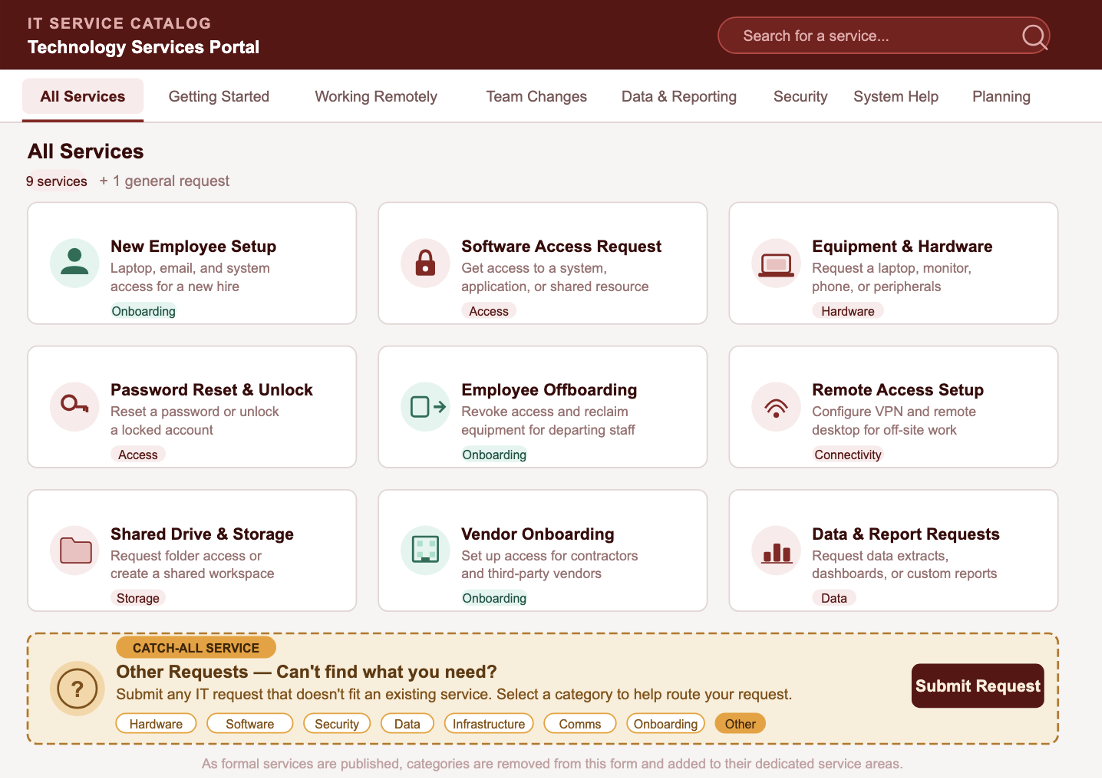
The Dreaded Service Catalog
There is a particular kind of document that lives on IT intranet pages across every large organization. It has a title like IT Service Catalog or Service Portfolio. It is organized into categories that make sense to IT staff. It lists dozens—sometimes hundreds—of services, each with its own entry: a name, a description written in technical language, a request link, and perhaps an SLA metric or two.
Almost nobody uses it.
Business stakeholders have learned, through experience, that the catalog is not for them. It was built to satisfy a governance requirement, or to give the IT organization a way to track and manage its offerings. As a byproduct, it was published to the intranet. That is not the same thing as being designed for use.
This article is about closing that gap—understanding why IT service catalogs so consistently miss their mark, and how to build one that business stakeholders actually turn to when they need something.
Why Most Service Catalogs Fail
The problems with most IT service catalogs are not technical. They are architectural and philosophical.
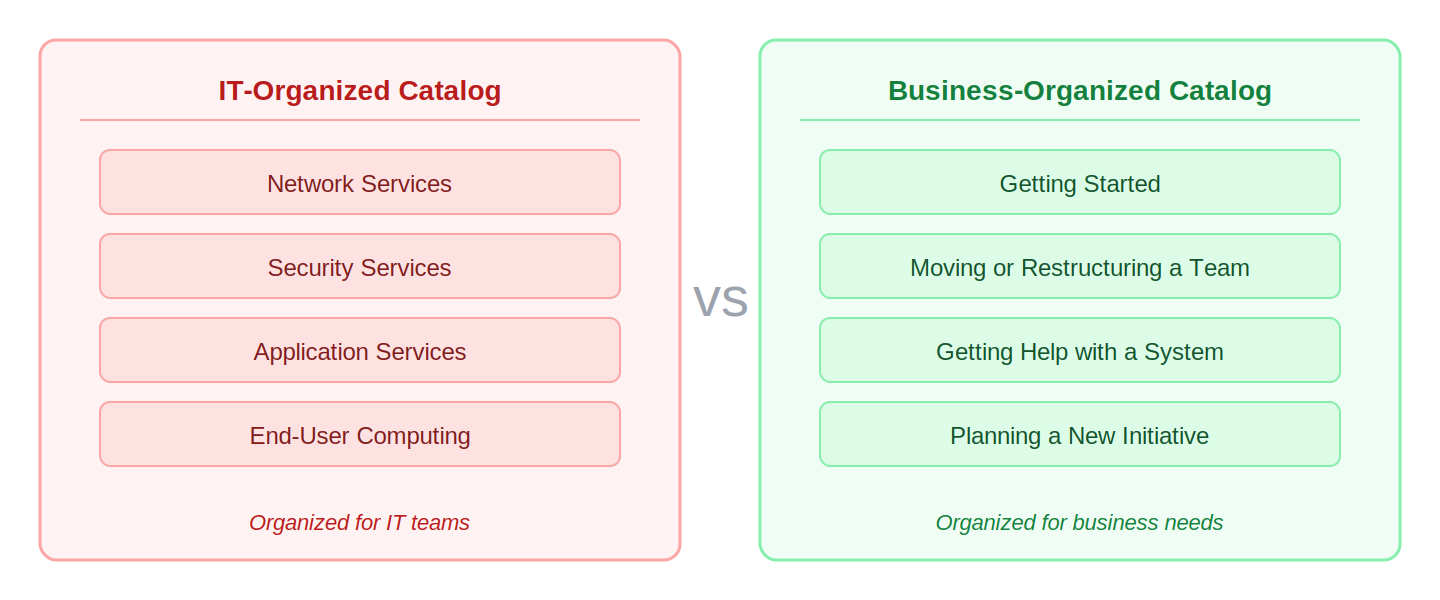
The catalog is organized for IT, not for the business. When IT designs a service catalog internally, it naturally organizes offerings by the teams that deliver them: network services, security services, application services, end-user computing. That structure is meaningful to the IT organization. It is nearly meaningless to a department head trying to figure out how to onboard five new employees, stand up a new business unit, or respond to an audit. Business stakeholders do not think in terms of IT silos. They think in terms of outcomes and needs.
Consider a hiring manager who needs to get a new employee fully operational by their first day. That task touches at least four IT domains: end-user computing (laptop), identity and access management (account creation and system access), networking (VPN and building access), and application services (provisioning in HR, finance, and productivity tools). In a catalog organized by IT team, that manager has to know to look in four different places—and know enough about IT structure to find the right section in each one. Most will give up after the first category and call someone instead.
The language is technical. Entries like "Virtual Machine Provisioning - Tier 2 Compute" or "IAM Role Binding Request" communicate nothing useful to a non-technical audience. Even services with benign names--"Collaboration Tools Support"--are often described in ways that require prior knowledge of what the tools are and how they are managed. When a business user cannot quickly understand what a service is and whether it applies to their situation, they stop looking and start calling or emailing someone instead.
There is no indication of what to expect. Most catalog entries include SLA statements--"Resolved within 4 business hours"--but provide little context around what triggers that clock, what inputs are needed, what happens next, or what a completed request actually looks like. Lack of process clarity erodes trust. Business stakeholders have been burned before by submitting a request and hearing nothing for two weeks. A catalog that does not address this anxiety will not be used.
A typical catalog entry for a software access request might read: "Access provisioning. SLA: 2 business days. Submit request via portal." That tells the requester almost nothing useful. Does the two-day clock start when the form is submitted, or when a manager approves it? What manager? Is approval even required? What does "access provisioned" actually mean--will they receive an email, or do they just try logging in? A business user reading that entry has no confidence the process will work, and no way to follow up intelligently if it does not.
It is not kept current. Nothing destroys confidence in a service catalog faster than outdated information. A link to a decommissioned system, a service that no longer exists, or a request process that has changed without the catalog being updated--these are credibility-killers. Once a business user discovers the catalog is unreliable, they abandon it and develop workarounds.
It is designed to document, not to guide. A service catalog that functions primarily as a record of IT's offerings is a reference document. A service catalog designed to guide business stakeholders through the process of getting what they need is a tool. Most catalogs are the former. Effective ones are the latter.
It does not cover enough ground. Even a well-written, well-organized catalog fails business users if the service they need simply is not in it. Building out a full catalog--defining, describing, and publishing every service, and automating intake and fulfillment on the backend where possible--is a significant undertaking that takes quarters, not weeks. In the meantime, business users who cannot find what they are looking for have no good option. If the catalog offers no answer for uncovered needs, those requests flow back through email, phone calls, and personal relationships--exactly the informal channels the catalog was meant to replace. Incomplete coverage does not just leave gaps; it actively undermines confidence in the catalog as a whole.
There’s no dedicated IT staff behind the service. One of the most frustrating things for your business users is when they request a service and their request vanishes into a void of nothingness that is caused by IT reorganizations, staff role changes, or staff cuts. Like the above highlighted problems, it puts your business in a position of now knowing who to turn to for getting things done and, much worse, it erodes trust in the IT organization.
What a Working Service Catalog Actually Does
Before redesigning a service catalog, it helps to be clear about what success looks like. A service catalog that works for business stakeholders accomplishes four things.
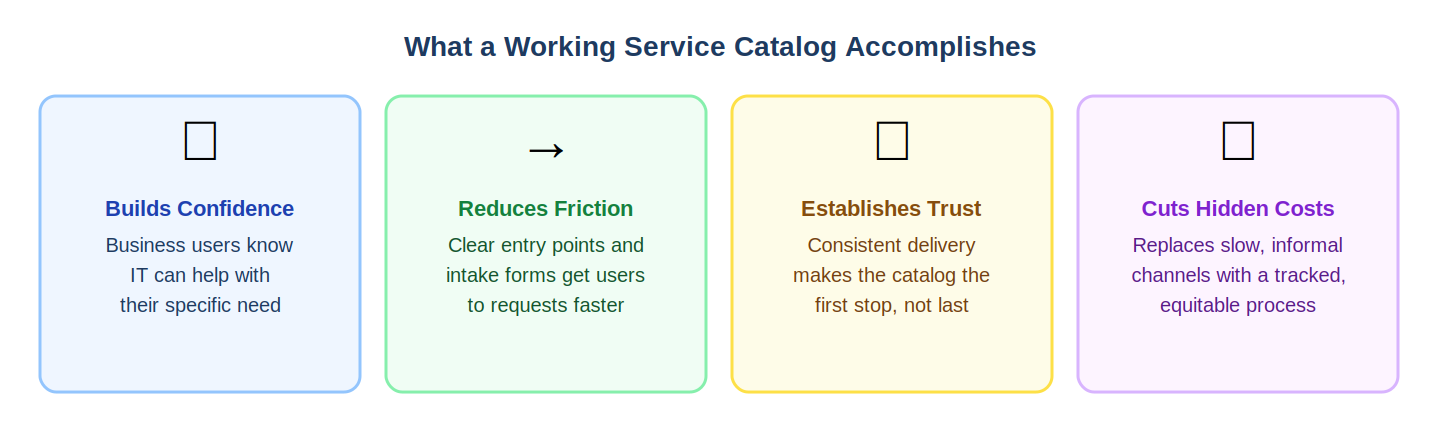
It answers the question "Can IT help me with this?" The primary value of a service catalog to a business user is not a list of services--it is confidence. Confidence that there is a defined, supported path for getting something done. That confidence requires that the catalog be organized and described in terms the business user recognizes.
It reduces friction in the request process. A working catalog does not just tell stakeholders that a service exists--it gets them as close as possible to initiating the request with minimal confusion or back-and-forth. That means clear entry points, logical intake forms, and enough context to set expectations before the request is submitted.
It establishes trust through consistency. When business stakeholders submit requests and consistently receive what the catalog described--within the timeframes stated, with the process outlined--the catalog becomes trusted. Trust, once established, is self-reinforcing. It makes the catalog the first stop rather than the last resort.
It reduces the hidden cost of informal IT requests. In organizations where the service catalog is not used, IT work still gets done--but through email threads, hallway conversations, and personal relationships. That informal channel is slow, untracked, and inequitable. A working service catalog makes the formal path easier than the informal one, which benefits both IT and the business.
Design Principles for a Service Catalog That Works
1. Organize by Business Need, Not IT Structure
The primary navigation of a service catalog should reflect how business users think, not how IT is organized. Common need-based categories include: Getting Started (onboarding, access, equipment), Working Remotely, Moving or Restructuring a Team, Managing Data, Staying Secure, Getting Help with a System, and Planning a New Initiative.
These categories do not map cleanly to IT team boundaries--and that is the point. A business user navigating to "Moving or Restructuring a Team" should find everything they need, even if fulfillment spans network, identity, end-user computing, and application teams. The organizational complexity of delivery is IT's problem to solve, not the business user's problem to understand.
2. Write for the Reader, Not the Provider
Every service description should pass a simple test: could a non-technical employee in your organization read it and immediately understand what it is, when they would need it, and what it will do for them?
That standard rules out most of the language currently in most service catalogs. Compare these two descriptions of the same service:
IT language: "Provides enterprise IAM role binding and entitlement management for provisioned identities across federated application environments. Supports RBAC configurations aligned to security policy."
Business language: "Need to give a team member access to a new system or application? This service handles the request, gets the appropriate approvals, and sets up their access. You will need their name, employee ID, the system they need access to, and their manager's approval."
Both describe the same capability. Only one of them is useful to the person who needs it. Short sentences, plain language, and a business-first framing are not a dumbing-down of the catalog. They are what makes it usable.
3. Make the Process Visible
For each service, describe the process in terms the requester will recognize: what they need to provide, what happens after they submit, who will be in touch and when, and what a completed request looks like. Here is what a process-visible entry might look like for a new employee setup request:
What you will need: The new employee's full name, start date, job title, department, and their manager's name. If they need access to specific systems beyond the standard set, list those as well.
What happens next: After you submit, your request goes to your department's IT coordinator for confirmation. You will receive an email acknowledgment within two hours. The employee's laptop, email account, and standard system access will be ready by 8:00 AM on their start date, provided the request is submitted at least three business days in advance.
What you will receive: A confirmation email the evening before the start date with login instructions and a checklist to share with the new employee.
That level of detail takes less than five minutes to write and eliminates the majority of follow-up calls and emails that IT receives about onboarding requests. When people know what to expect, they stop worrying that their request has vanished into a black hole.
4. Maintain It as a Living Document
A service catalog is not a project--it is an ongoing capability. Assign clear ownership for catalog accuracy, establish a review cadence, and create a simple process for flagging outdated entries. When services change or are retired, the catalog should be updated before the change takes effect, not after.
Consider surfacing a "last reviewed" date on each catalog entry. Transparency about currency signals to business users that the catalog is actively maintained. It also creates an accountability mechanism for the owners of each service.
5. Integrate with Existing Business Workflows
A service catalog that lives in isolation--disconnected from the tools business users already work in--will always struggle for adoption. In practice, this can be as simple as embedding a direct link to the New Employee Setup catalog entry inside the HR system's hiring completion workflow. Or it can mean publishing a pinned IT Services card in the company's Teams environment so that employees can search for services without leaving the tool they use all day.
Organizations that have done this consistently report that catalog adoption increases not because the catalog improved, but because the distance to it shrank. The goal is to make the service catalog the path of least resistance, not an additional place to remember to go.
6. Measure What Matters for the Business
Most service catalogs are measured by IT-facing metrics: ticket volume, resolution time, SLA compliance. These are operational metrics, and they matter--but they do not tell you whether the catalog is working for the business.
Add measures of business-side adoption: What percentage of IT requests are coming through catalog-defined channels versus informal routes? Are business users able to find what they need without calling the help desk? Are satisfaction scores improving over time? These measures provide a direct feedback loop on whether the catalog is meeting its purpose.
7. Keep Services Staffed Under All Circumstances
Any service that is not properly staffed makes an IT organization look like a useless void to business users. To avoid this, ensure that services and their staffing are part of all staffing conversations, including but not limited to reorganizations, hiring, firing, or even simple changes in internal staff roles and responsibilities. It is easy to promote a person into a new role in a different area of IT, leaving a void in the service area they were a part of. They only way to not let this happen is to keep service staffing and service capacity management at the forefront of all staff changes.
A Practical Starting Point
Redesigning a service catalog from scratch can feel daunting, especially in large organizations with complex IT environments. The good news is that it does not need to be done all at once.
Start by identifying the ten to fifteen services that business stakeholders request most frequently. In most mid-size organizations, that high-priority list looks something like this: new employee setup, employee offboarding, software access requests, password resets and account unlocks, laptop or equipment requests, remote access setup, shared drive or folder access, new vendor or contractor onboarding, data or report requests, and meeting room or conference technology support. These ten categories often account for sixty to seventy percent of all IT service requests. Getting them right first delivers the greatest return on effort and builds early credibility with business stakeholders.
From there, expand coverage systematically, using feedback from business users to prioritize which services to improve next. A catalog that works well for the most common needs, and is clearly improving over time, will build the trust and adoption that make full coverage worthwhile.
The Catch-All Service: A Bridge While You Build
As noted above, incomplete service coverage is one of the most common--and most damaging--reasons a service catalog fails to gain traction. Even after agreeing on the right design principles, IT organizations face a daunting reality: dozens or hundreds of services need to be defined, described, structured for business users, published in the catalog, and--where viable--automated on the backend. That work takes time. Done well, it is measured in quarters, not weeks.
The practical risk is that the catalog stays incomplete indefinitely. IT teams prioritize the highest-volume services, get pulled into other work, and the long tail of services never gets built out. Business users who cannot find what they need fall back on informal channels, and the catalog's credibility erodes before it has a chance to establish itself.
The solution is a catch-all service--a single, broadly scoped catalog entry that acts as a general intake bucket for any request that is not yet covered by a specific, built-out service. Rather than sending business users to an email address or a generic help desk, the catch-all gives requestors a structured way to submit needs that the catalog has not yet formalized.
A well-designed catch-all entry includes a broad set of categories--hardware, software access, data, communications, infrastructure, security, vendor onboarding, and an explicit "Other" option--that help classify the request at submission. Those categories do not need to map to individual IT teams. Their purpose is to capture enough context to route the request intelligently, even if the initial destination is a single intake team responsible for parsing and triaging what comes in.
This approach has several practical advantages. It gives business users a reliable answer to the question "what do I do if I can't find what I need?"--which is itself a trust-building signal. It captures demand data on services that are being requested but have not yet been formalized, which directly informs the backlog of services to build next. And it establishes the habit of using the catalog, even in its incomplete state, rather than routing around it.
The catch-all is explicitly designed to shrink over time. As specific services are built out and published, their corresponding categories disappear from the general bucket and migrate into their dedicated service areas--complete with tailored descriptions, intake forms, process documentation, SLAs, and whatever backend automation has been implemented.
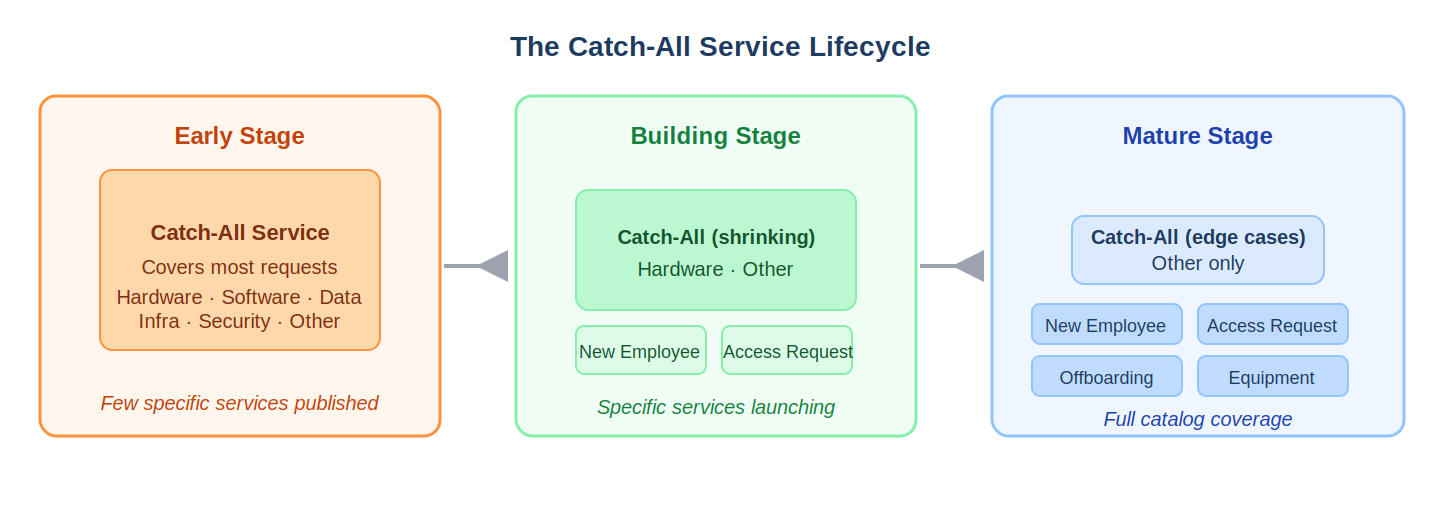
The catch-all never goes away entirely--there will always be edge cases and new needs that precede formal catalog coverage. But its scope narrows progressively as the catalog matures, which is exactly the right direction of travel. Think of it as scaffolding: it holds the structure together while the permanent work is being done, and unlike scaffolding, it continues to deliver value--capturing requests, generating demand data, and maintaining business confidence--throughout the entire build.
Closing Thought
A service catalog that business stakeholders understand, trust, and use is not a documentation artifact--it is a relationship between IT and the business, codified. It communicates that IT has thought about what the business needs, organized itself around those needs, and committed to delivering consistently.
That kind of catalog does not emerge from a governance exercise. It emerges from a deliberate decision to design for the people who need it most. The technical side of IT service management is, in most organizations, already well understood. The harder and more valuable work is making that capability legible, accessible, and trustworthy to everyone outside the IT function.
That is the work a good service catalog does. And it is entirely achievable.
Published by IF4IT.com — The International Foundation for Information Technology